
How to Use AI for X/Twitter Without Looking Robotic
AI tools can supercharge your X/Twitter growth — but only if your engagement looks human. This guide covers the strategies, settings, and mindset shifts that separate credibility-building AI use from reputation-destroying bot behavior.
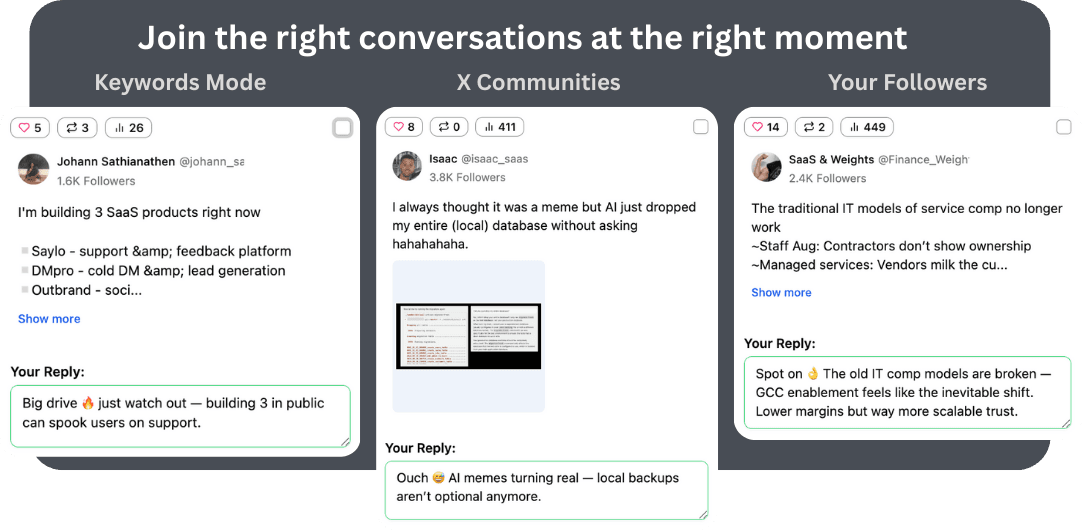
The AI Authenticity Problem on X/Twitter
Users are increasingly hostile toward obvious AI engagement. Generic praise and hollow agreement get called out.
The best creators use AI — you just can't tell. The difference is HOW you use it. This guide shows you how to stay authentic.
The Backlash Is Real
Users actively call out and unfollow accounts posting obvious AI replies
Good AI Use Is Invisible
The best AI-assisted accounts are indistinguishable from manual engagement
Strategy Over Tools
The tool matters less than how you configure and use it
7 Strategies for Authentic AI Engagement
How to use AI reply tools without triggering anyone's bot radar.
1. Invest Time in Voice Configuration
Spend 15-20 minutes setting up your AI voice profile. Include your actual communication style: are you formal or casual? Do you use humor? Do you ask questions? The better the AI knows your voice, the more natural every reply sounds.
2. Always Add New Information
Configure your AI to add perspective, not just agree. A reply that says 'Great point, and I'd add that X is also true because Y' is 10x more credible than 'Great point! 🔥'. Train your AI to contribute, not just validate.
3. Edit 20% of Your Replies
Even if 80% of AI drafts are perfect, manually editing the other 20% adds variability that pure automation can't replicate. Add personal anecdotes, specific references, or contrarian takes.
4. Use the Reply Quality Filter
XJumper's built-in reply filter catches generic patterns before posting. Enable it to automatically revise replies that sound too generic, use too many emojis, or follow repetitive structures.
5. Vary Your Reply Length and Style
Don't always reply with 2-sentence responses. Mix short reactions, medium insights, and occasional long-form replies. Natural humans don't have uniform reply lengths.
6. Reply to Different Types of Posts
Don't only reply to popular posts in your niche. Engage with smaller accounts, off-topic threads, and personal updates from people you follow. This diversity signals genuine human engagement.
7. Skip Posts You Shouldn't Reply To
Not every post deserves a reply. If you can't add value, skip it. Over-replying to everything is a bot signal. Configure minimum relevance thresholds so the AI only drafts replies when there's genuine value to add.
XJumper Settings for Maximum Authenticity
Specific XJumper configuration tips to keep your replies human.
Voice Profile: Be Specific
Don't just set 'professional tone'. Include examples of your actual replies, banned phrases you never use, and specific instructions like 'always ask a follow-up question' or 'reference personal experience when relevant'.
Reply Filter: Enable at Medium Sensitivity
The default filter catches the worst bot patterns. Medium sensitivity adds checks for structural repetition and emoji overuse. This is the sweet spot for most users.
Pacing: Slower Is More Natural
Set reply delays to 120-300 seconds. Humans don't reply to 10 posts within 2 minutes. Wider spacing looks more natural, even if it means fewer total replies per day.
Auto Reply Safety & Quality Controls
XJumper is designed with account safety as a priority. Multiple safeguards ensure your auto replies look natural and protect your account from rate limits.
Rate Limiting & Pacing
- Configurable daily reply limits
- Randomized delays between replies (60s-300s)
- Cooldown periods after bursts
- Quiet hours scheduling
Quality & Authenticity
- AI-generated contextual replies (not templates)
- Brand voice and tone settings
- Banned phrases and content filters
- Optional manual approval before posting
Maximize Smart Reply with Other Features
Auto reply works best as part of a complete engagement strategy. Combine with XJumper's other tools for maximum impact.
Smart Follow
Follow the accounts you reply to for higher follow-back rates. Reply + Follow is the strongest growth combo.
Learn more →AI Post Generator
Create compelling content that makes people visit your profile after seeing your replies.
Learn more →Smart Analytics
Track which replies drive the most profile visits and follows to optimize your engagement strategy.
Learn more →FAQ
Use AI That Sounds Like You, Not a Bot
XJumper Smart Reply with voice customization and quality filters — authentic AI engagement that builds credibility.
Try Authentic AI Replies Free