
X Community Engagement Workflow — Discover, Reply, Track, Repeat
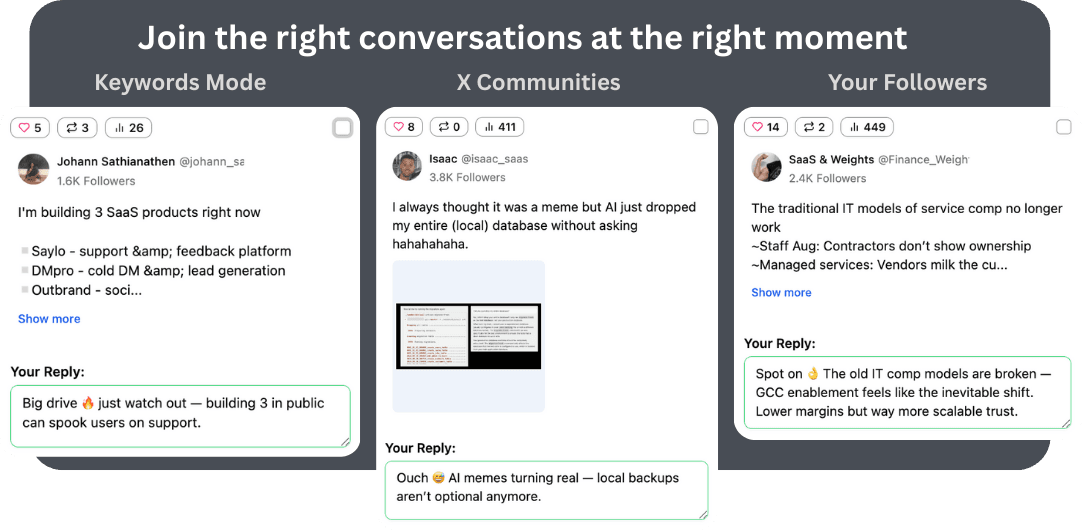
Growing through X Communities isn't about one tool — it's about a workflow. XJumper combines discovery, AI-powered replies, and analytics into a systematic engagement process that turns community participation into follower growth.
Why You Need a Community Engagement Workflow
Ad-hoc community engagement wastes time and produces inconsistent results.
A systematic workflow: discover → reply with AI → track what works → double down on winners. XJumper ties discovery, Smart Reply, and analytics into one repeatable process.
Systematic, Not Random
A repeatable workflow produces 3-5x more results than ad-hoc engagement
Multi-Tool Integration
Discover + Reply + Track — three capabilities working as one workflow
Data-Driven Optimization
Track what works and shift effort to the highest-performing communities and topics
The 4-Step Community Engagement Workflow
A daily repeatable process for systematic community growth.
Step 1: Discover — Find Active Discussions
Use XJumper to monitor your target communities for trending posts, active threads, and unanswered questions. Set filters for minimum engagement and recency to focus on discussions with momentum.
Step 2: Reply — Engage with AI-Powered Context
Smart Reply reads each thread's full context and generates a reply that adds value. Review drafts, add personal insights, and approve. XJumper posts with natural spacing across communities.
Step 3: Track — Measure What Works
Use Smart Analytics to track which communities drive the most profile visits, follow-backs, and engagement. Identify your top-performing communities and topics.
Step 4: Optimize — Double Down on Winners
Shift your daily engagement budget toward top-performing communities and topics. Drop communities with low returns. Add new communities to test. This continuous optimization compounds your results.
The Daily Community Engagement Routine (20 Minutes)
A practical daily routine that fits into any schedule.
Morning (7 min): Discover & Queue
Check XJumper's discovery feed for fresh community discussions. Review AI-drafted replies, approve or edit, and queue for posting throughout the day.
Midday (5 min): Quick Engagement Check
Check for replies to your community comments. Respond to follow-up questions — this deepens threads and increases visibility.
Evening (8 min): Track & Plan
Review today's engagement metrics in Smart Analytics. Note top-performing communities and topics. Adjust tomorrow's discovery settings based on what worked.
Auto Reply Safety & Quality Controls
XJumper is designed with account safety as a priority. Multiple safeguards ensure your auto replies look natural and protect your account from rate limits.
Rate Limiting & Pacing
- Configurable daily reply limits
- Randomized delays between replies (60s-300s)
- Cooldown periods after bursts
- Quiet hours scheduling
Quality & Authenticity
- AI-generated contextual replies (not templates)
- Brand voice and tone settings
- Banned phrases and content filters
- Optional manual approval before posting
Maximize Smart Reply with Other Features
Auto reply works best as part of a complete engagement strategy. Combine with XJumper's other tools for maximum impact.
Smart Follow
Follow the accounts you reply to for higher follow-back rates. Reply + Follow is the strongest growth combo.
Learn more →AI Post Generator
Create compelling content that makes people visit your profile after seeing your replies.
Learn more →Smart Analytics
Track which replies drive the most profile visits and follows to optimize your engagement strategy.
Learn more →FAQ
Start Your Community Engagement Workflow
Discover, reply, track, optimize — a systematic approach to community growth powered by XJumper.
Try the Workflow Free